Policy configuration
Start with explicit domains and trusted roles
The current Policy service evaluates configured clearance levels and compartments. It is intentionally narrower than a general-purpose role and permission language.
Example configuration
{
  "domains": [
    { "id": "reader-team-a", "level": "SECRET", "compartment": "TEAM_A" },
    { "id": "report-team-a", "level": "RESTRICTED", "compartment": "TEAM_A" },
    { "id": "report-team-b", "level": "RESTRICTED", "compartment": "TEAM_B" }
  ],
  "principals": [{
    "id": "internal-api",
    "domainId": "reader-team-a",
    "tokenHash": "<sha256 digest of a random 32-byte token>",
    "roleDomains": { "user": "reader-team-a" }
  }]
}
Generate a fresh random service token, store only its lowercase SHA-256 digest in the policy file, and provide the raw token only to the trusted API process. Keep policy files and local credentials private.
Decision flow
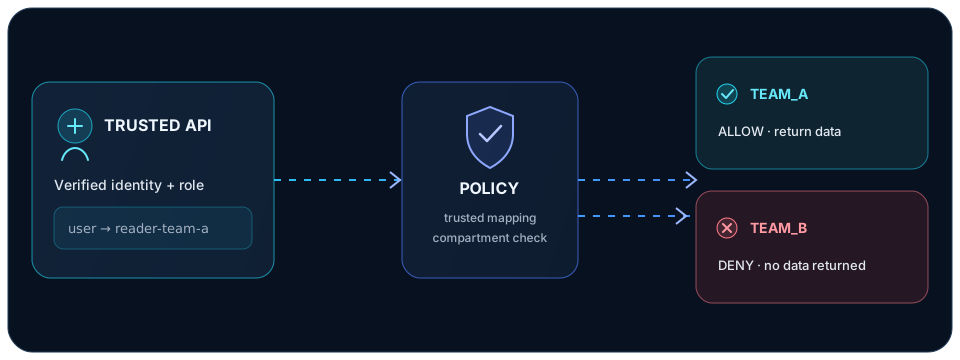
- Identity verifies the end-user access token and active session.
- The API sends the resulting user ID and role to Policy using its private service token.
- Policy resolves the role through that API principal's
roleDomainsmapping. It does not accept user-supplied clearance or source-domain IDs. - The API returns data only for an allow decision. An unmapped role or policy denial must not become an allow.
Validate before using a policy
npm run validate-policy -- /path/to/policy.jsonThe command validates the policy structure and references; it does not prove that the policy matches your organization's intent. Review changes, protect the file and service token, then restart Policy to load the new configuration.
Current semantics and limits
- Compartments are isolated: a subject in one compartment is denied access to another.
- Clearance levels apply the configured no-read-up/no-write-down rules.
- EXECUTE is denied until an execution policy is defined.
- This is not a generic per-resource permissions engine, policy authoring UI, or automatic API enforcement layer.
See the request flow and working example.